schedule

Maximizing the Value of Schedule Risk Assessments (SRAs)
, , , , , , , ,

Quick Summary

  • SRAs are only as valuable as the intent and quality behind them. Treating them as a check-the-box compliance requirement produces meaningless results that get filed away and never used.
  • Real-world examples show how cost pressure and last-minute guidance changes at kickoff can derail an SRA, leaving project teams with outputs no one trusts or acts on.
  • Focusing three-point estimates on tasks that drive critical and near-critical paths delivers real insight without the prohibitive cost of analyzing every task in a large IMS.
  • Documented assumptions for selected tasks produce derived duration factors that are far more accurate than gut-feel percentages, and the difference shows up directly in the SRA results.

A previous blog, Schedule Risk Assessment Fundamentals, highlighted that when properly used, schedule risk assessments (SRAs) are a powerful management tool that can contribute to project success. It does, however, require a high-quality integrated master schedule (IMS) that is integrated with a disciplined risk management process. When conducted with the intention to gain a realistic view of schedule outcomes and risk drivers, it provides management with additional insight and an early warning indicator of potential threats to meeting schedule objectives.

The Challenge with Conducting SRAs

Schedule risk assessments are frequently a topic of discussion in project management circles and sometimes for the wrong reason. A well-run SRA can provide the confidence levels for achieving different schedule end dates as well as valuable insight into the IMS. However, the SRA is particularly susceptible to the “garbage in – garbage out” (GIGO) principle.

H&A consultants have recently observed discussions that indicate SRAs are not being properly performed or used to help manage projects. Some of these observations reinforce the GIGO principle.

One H&A senior consultant sat in on a meeting with the government program manager for a large project where the consultant, having worked on the just-completed SRA, asked the government program manager what they would do with the results. The amazingly honest answer was, “Sadly, it will just be filed. It is seen as a check-the-box thing we have to do.”

Using the results of the SRA to stuff the drawer might not be as wild a response as it seems. Too many times, we see the SRA being done in a perfunctory manner using inputs that will not yield useful management information and insight. One way people are cutting corners on the SRA is by applying global factors to the existing duration estimates and running the simulation with those durations. Applying a formula across the board is not the same as analysis. Yes, the SRA can be done so poorly it is meaningless. This is especially true if the applied factors are not realistic.

An Example of What to Avoid

One of our consultants observed that in one case the best of intentions were thwarted in the SRA by cost pressures and lack of management commitment. The manager of the SRA provided a form to each CAM for them to provide the best case, worst case, and most likely case duration estimates and provide written explanations for all three cases. The instructions were for the CAMs to use the form for every incomplete task and future task.

There were about 10,000 such tasks distributed among 70 or so CAMs. On average, that would be 140+ tasks for each CAM. Doing three-point estimates for 140 tasks would be a large expense and consume a lot of valuable time, without even mentioning the cost.

The government program manager, who pays the bills, was present at the kickoff meeting for the SRA and intervened immediately when he heard the directions being provided. He stated that he would not pay for all that effort; it would be too costly. Unfortunately, there was no probing to find out what would be reasonable to this manager in terms of details for the SRA.

Instructions for this SRA were revised on-the-fly and the SRA was done. It was done poorly; in some parts due to the disruption at the kickoff meeting and the poor guidance. The intervention of the government program manager had left the impression that the SRA “was not worth it.” That impression was wrong.

The idea of documenting the three-point estimates is a good one, but too time-consuming to be applied to every task. There are valid options that can still benefit from this detailed look at the durations, yet avoid the significant expense of analyzing all the tasks.

A Better Approach

One approach is to do a detailed analysis of the three-point estimates for specific selected tasks that reduces the number of tasks that require detailed manual estimation. The focus should be on the tasks that provide insight into the part of the IMS most likely to cause the end date or a major event date to change. Examples include those tasks that are:

  1. On one or more of the top number of critical paths.
  2. On the path to the next major event (these tasks can be found using the driving path approach).
  3. Known to be or assumed to be prone to duration risk.
  4. Known to require scarce resources that may have limited availability.
  5. Believed to be drivers of duration risk for other reasons.

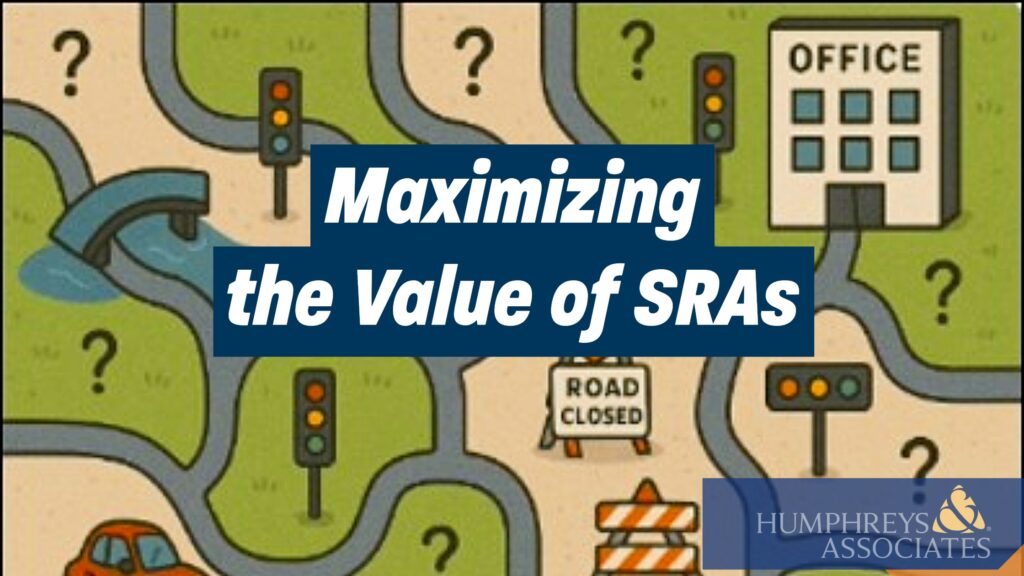
A simple example will help to understand why documenting the three-point estimates for some tasks is basic to achieving a useful SRA. If you, acting as a CAM, were asked to estimate the time required to drive 10 miles from your home to work by car in a hypothetical town, you would want to understand the scope of the effort. A drive of 10 miles through the countryside, or on a freeway, or on city streets can be very different.

stylized road map of confusing roads

Some help with the assumptions could improve your estimate. If you were told that the first 5 miles of the drive was in town, where the speed limit is 25 mph with the potential for red lights along the way, and the last 5 miles is on the freeway, where the speed limit is 60 mph, this would help you produce a better estimate.

In fact, you will get a better estimate by understanding the scope, the assumptions, the risks, and so on. When doing the three-point estimate, you would employ a process that includes these steps that consider:

  1. The nature of the task. What exactly is to be done in the task?
  2. Past experience. Have we done this or similar work before?
  3. Capabilities. For example, can you drive, does your car work well, can you go up to 60 mph in your car, do you have gas, and are you equipped for potential weather?
  4. Assumptions. How many traffic lights are there along the way? How long would you wait at a red light? What time of year is it? What day of the week? What time of day?
  5. The risks. Are there possible road issues, such as construction? How about traffic issues? Accidents?

Now, suppose you were required to document your estimated durations. Using the assumption details from above, you might end up with this:

CaseDurationAssumptions
Best17 minutesA dry day, early in the morning before traffic, you have all green lights, and you obey the speed limit.
Most Likely23 minutesThe road is fine, first 5 miles is at 25 mph. Only 2 red lights with a wait time of 2 minutes each, and 7 minutes for freeway travel at 45 mph.
Worst Case32 minutesThe road is slippery and you can only travel at 20 mph. You must stop at 3 red lights and sit for 2 minutes each. You have one unexpected stop for 4 minutes because of other drivers. Also, the freeway speed is only 45 mph.

You now have a set of durations you can use in the SRA. You also have the details needed for explaining the duration estimate. Additionally, there is enough information to be able to change the estimates if presented with new facts or revised assumptions. For example, perhaps the project’s period of performance moves to the right and the work will now be performed in the winter. You can adjust your estimates for winter weather impacts.

You also have enough information to be able to derive factors to be used in formulae to generate three-point estimates for other tasks. Be careful to make sure you only use the information to generate a factor on similar work. In this case, the factors would be -26% and +39%. Those are derived factors. For comparison, a common “gut feel” reaction to the question of what factors should be used is usually more like minus 5% and plus 10%. Using derived factors versus a “gut feel” will yield significant differences in the SRA and the value of the results.

Recommendations to Increase the Value of an SRA

Begin with the intention to treat the SRA as the important and valuable tool it is. Choose to change the approach from a “check-the-box” or compliance mentality into a straightforward process that helps to produce a more realistic and executable IMS. No one likes schedule or resulting cost surprises as discussed in another blog, Maintaining a Credible Estimate at Completion (EAC), that also addresses why a credible forecast completion date is equally important. Here are a few suggestions to improve your approach to conducting SRAs:

  1. Provide clear, specific directions to project personnel on what is expected. Highlight why the SRA is an important step.
  2. Verify a quality IMS has been established.
  3. Validate the risk information.
  4. Do focused analysis of discrete tasks on a given number of critical and near-critical paths and document the rationale for the best/worst/most-likely case durations.
  5. Do focused analysis on driving path tasks if not on the critical paths.
  6. Do focused analysis on known risks.
  7. Use realistic factors derived from reality when applying factors to the larger body of IMS tasks.

Taking Action

Producing a quality IMS takes skilled master schedulers that understand the management and predictive value of a well-constructed schedule. The next step up to improve the realism of the IMS is to conduct an SRA when it makes sense. Examples include conducting an SRA as part of the process to establish the baseline schedule, when there is major change, or before a major event such as a Critical Design Review (CDR).

It is not an easy task to distill the steps to conduct a value-added SRA into a well-defined and useful process. H&A master schedulers and risk subject matter experts often work with clients to establish a pragmatic SRA process. They also train and mentor project teams on how to use the SRA outputs to produce realistic schedules with a higher probability of success. Call us today to get started.

Maximizing the Value of Schedule Risk Assessments (SRAs) Read Post »
Survey of Schedule Acceleration Techniques

, , , , , , ,
Survey of 
Schedule Acceleration Techniques - An overview of schedule acceleration techniques discussed in the PASEG

The NDIA Integrated Program Management Division (IPMD) Planning and Scheduling Excellence Guide (PASEG) includes a list of the acceleration techniques that can be applied to reduce project schedule duration. That section of the guide provides the background for project team discussions on accelerating complex integrated master schedules (IMS) in government contracting environments. This blog is intended to increase awareness of the techniques in the guide and provide some additional insight into their application. It relies heavily on the guide’s content. 

An additional purpose of this blog is to promote the use of the NDIA IPMD nomenclature across the defense industry spectrum. In much the same way as the earned value management (EVM) acronyms of BCWS, BCWP, ACWP and others have become standard terminology, it would be beneficial to have a more standard way of discussing schedule acceleration techniques. As the PASEG is an industry guide developed and maintained in collaboration with U.S Government agencies, the PASEG promotes a common understanding of these techniques.

One caution. Modifications like the ones discussed here can introduce additional risk into the schedule and reduces flexibility. Be careful when modifying the schedule. A good practice is to first create a copy of the schedule and assess the effects of your changes before you adopt them. The trade-offs may or may not be acceptable depending upon the objective you want to achieve. If the schedule is the priority, there is likely to be an impact on the work scope or cost. There can also be unintended consequences when potential impacts are overlooked. 

Let’s review the techniques from the PASEG. 

  1. Crashing. 

The guide says “This technique allows for the acceleration of schedule by applying additional resources or more experienced resources to do the work in a shorter period of time. This method assumes that the task can be completed in a shorter amount of time with the increase in resources.”

We probably have all used this method when we are shopping on the internet and we are faced with the choice between receiving the item in 5 days or accelerating that to 3 days or even the next day. We are paying more to get it faster. But what is really happening behind the scenes? Do they pick your order first? Do they pack it first? Do they ship it on faster carrier? Those are the actions you would be considering on your project when you want to accelerate something by crashing the schedule.

Using outside or contract labor is a form of this where we boost our workforce for a period when we need extra effort. A form of this is offloading some work to a subcontractor.

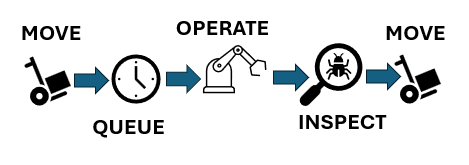
A more detailed example comes from the factory setting where certain orders are “expedited”. What that might mean is that the normal movement process is subverted. The normal process might be as shown in Figure 1 with a queue time while your order waits for the machine. The machine will be torn down and set up for your work when it is most efficient to do so.

Process with wait time
Figure 1: Process with wait time

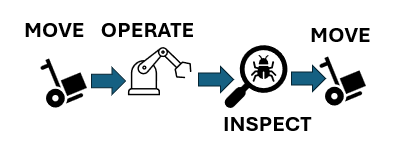
When you crash this process, you might simply remove the queue time so that as soon as your order arrives the machine is torn down and set up for your job to eliminate the wait time as shown in Figure 2.

Process with wait time eliminated
Figure 2: Process with wait time eliminated

However, using this approach is likely to increase cost and has the potential to introduce other risks to the project. A real-world example comes from the semiconductor industry where the factory was running both standard products and custom products. A normal custom order time of 8 weeks was cut to 2 weeks by using this approach. The cost that was charged to the customer for the rushed custom order was about 10 times the normal cost of an order to repay the factory for lost efficiency. 

  1. Fast-tracking.

The guide tells us “This technique accelerates the plan by performing work in parallel. With this method, extra attention needs to be put on resource de-confliction to ensure resources are not over allocated.”

We have all used this technique and probably had mixed outcomes. It seems simple and attractive. It embodies a “just get it done” mentality. If there are sufficient trained and capable resources then this can work. The resources can be used on both efforts at the same time. If that is not the case, then basically we would have to revert to pushing effort out of the way for another effort. This type of modification can introduce additional risk that may need to be mitigated.

  1. Streamlining.

The guide defines this technique in this way: “This technique depends on the team’s ability to find an alternate and more efficient completion methodology for the task/s. This includes reuse, innovation, and possibly eliminating non-value-added work. With this method, the program has to weigh the level of potential risk involved with these choices. Make sure that this does not drive a “run to fail” mode on the program. Ensure that tasks are meeting the full requirements and scope.”

Here we really need to be careful. In some cases, we might be working with specifications or requirements that demand a certain approach and cannot be changed or waived. Then we need to ask the question, “If there is a better way, why didn’t we assume that in the first place?”

In some cases, we might find this approach fits in with opportunity management. Maybe there is new software or a new machine available that can speed things up and still get things done correctly. We have all been in that situation; just remember the last time you went through a Windows upgrade. Did that go smoothly for you? 

In the area of software in particular, we must be aware of the entire ecosystem of tools we use and consider that any new tool applied in a hurry can result in problems. Case in point: one large contractor shifted from 2D drawings to 3D models to speed up and improve the processes, however not all the key suppliers were able to receive and use 3D models. The supply chain broke. Mom and Pop at the M&P Shop could not understand the new work orders. 

  1. Focused Work.

The guide describes focused work like this: “This technique employs the program management team to help in reducing multitasking and to remove barriers for the personnel on the program that are working critical and near critical program tasks. This method requires the program culture to adapt and “protect the critical/driving path” and to support the people that are working those efforts. This also requires the program manager to perform daily barrier resolution.”

A discussion on multi-tasking might be fun here, but we will assume for this blog that multi-tasking pulls resources away from tasks to do other selected tasks and that is not always the best approach. The big question here is what happens to the other efforts on the project when we focus on certain tasks. This technique can work well but only if we are aware of the impact to the other work and manage that work as well. Risk can be increased by adopting this approach so be alert. If we really are just removing barriers then we can benefit from this method. If we are just pushing aside other efforts to concentrate on this one, we need to know that and handle all the work properly.

  1. Calendar Adjustment.

The guide tells us, “This technique accelerates the plan by changing the amount of working hours available each day or working days available each week. This method is possible only if the resources and task location support working the increased work periods. Attention needs to be put on resource de-confliction to ensure resources are not over allocated.”

This is possibly the most attractive technique. Who has never had to resort to overtime to get something done? It is common to work extra hours, even over some weekends to get back on schedule. To a schedule practitioner, the calendar adjustment wording refers to the calendar in the scheduling tool and how it can be changed to add time in a day or convert non-working days to working days. 

This approach is not free. Overtime costs more than regular time and added shifts bring added costs. You should be aware you need to make a trade-off to determine whether the cost can be justified.

  1. Delay or Descope.

The guide advises, “If other techniques are not a viable option and the resultant schedule delay impact is unacceptable, an option exists to propose delaying or removing the selected scope.”

Notice the use of the word “propose.” Working on a contract may not afford the opportunity to eliminate work or consciously delay work. Coordination with the customer is required. Depending upon the customer’s immediate needs, they may be willing to take a more flexible approach to which work scope items can be delivered in a given time frame when they need to deploy something quickly. 

The PASEG goes on to tells us about things to promote and things to avoid. Those discussions are informative and useful. You are encouraged to obtain a copy of the PASEG and learn more on your own. More than that, you are encouraged to use this terminology and spread the use of it so that adoption spreads. 

Interested in learning more? The H&A Three Day Project Scheduling Workshop includes content on schedule acceleration techniques as well as managing schedule risk. This is a standard public workshop. Many of our clients schedule an in-house workshop that is specific to the scheduling tools they use such as Microsoft Project or Oracle Primavera P6. Call us today to get started.

Survey of Schedule Acceleration Techniques Read Post »

Understanding the As Late As Possible (ALAP) Scheduling Option in Practical Terms

, , , , , , , , , ,
Understanding the As Late As Possible Scheduling Option in Practical Terms

Many project professionals have spent entire careers without ever using the As Late As Possible (ALAP) scheduling option, although the underlying idea feels familiar. Why? Because it’s very similar to the “just-in-time” concept widely used in manufacturing and logistics.

In materials management, just-in-time means having what you need arrive exactly when you need it, minimizing storage costs and reducing inventory. The same principle can apply to project labor, but with some important cautions.

The “Right Time” for Project Work

On development or design projects, doing work too early can be counterproductive. If designs change, early work may become obsolete, forcing costly rework. The “right time” to perform a task is often determined by schedule logic. In some cases, however, it can also be guided by the ALAP constraint.

Before we explore when ALAP makes sense, let’s quickly review the two primary constraint options in Microsoft Project (and most other scheduling tools).

ASAP – As Soon As Possible

As soon as possible:

  • Is the default setting for forward-scheduled projects (when you set a project start date).
  • Means tasks are pushed as early as possible, immediately after their predecessors finish.
  • Is ideal when you want the earliest possible completion and clear visibility into float/slack.

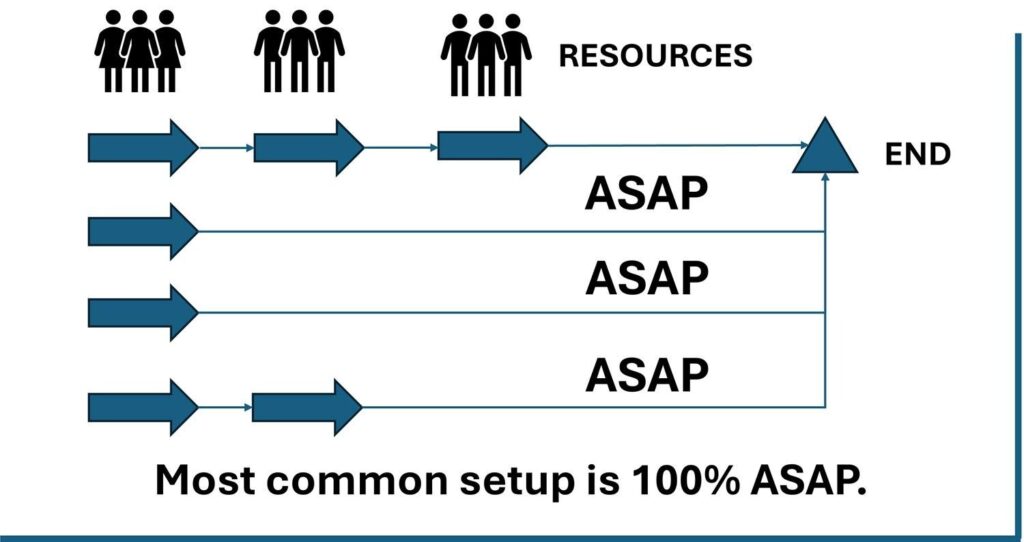
In an ASAP chain, every task begins at the earliest opportunity, pushing resources as far to the left as possible on the Gantt chart as illustrated in Figure 1.

Figure 1: As Soon As Possible Scheduling Option

ALAP – As Late As Possible

As late as possible:

  • Means tasks are scheduled as late as possible without delaying the successor or project finish date.
  • Is used in backward-scheduled projects (those planned from a fixed finish date) or when you want to defer work until the last responsible moment.
  • Microsoft Project automatically places each task at the latest feasible start date that still satisfies all constraints.

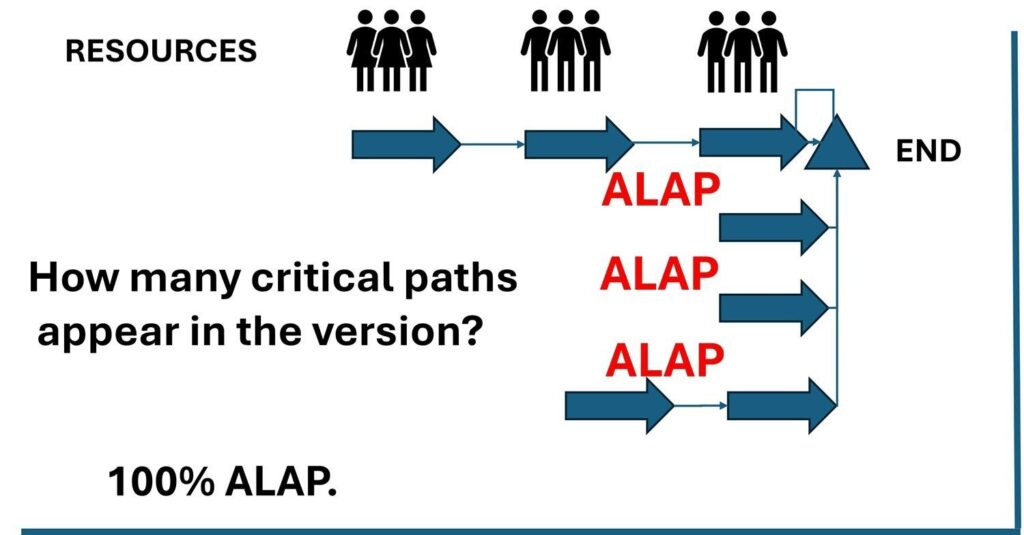
Switching a chain of tasks to 100% ALAP dramatically shifts all work to the right on the timeline as illustrated in Figure 2. The impact on management is significant: Every task now has zero total slack, which means any delay, even one day, directly delays the project finish. Multiple paths can appear “critical,” making control and reporting more complex.

Figure 2: As Late As Possible Scheduling Option

When ALAP Makes Sense

There are legitimate reasons to use ALAP selectively. For example:

  • When a task consumes resources you don’t want engaged early (e.g., expensive equipment rental or specialized consultants).
  • For just-in-time deliveries or procurements where early completion has no benefit.
  • When modeling backward scheduling. For instance, working from a fixed delivery date toward today.
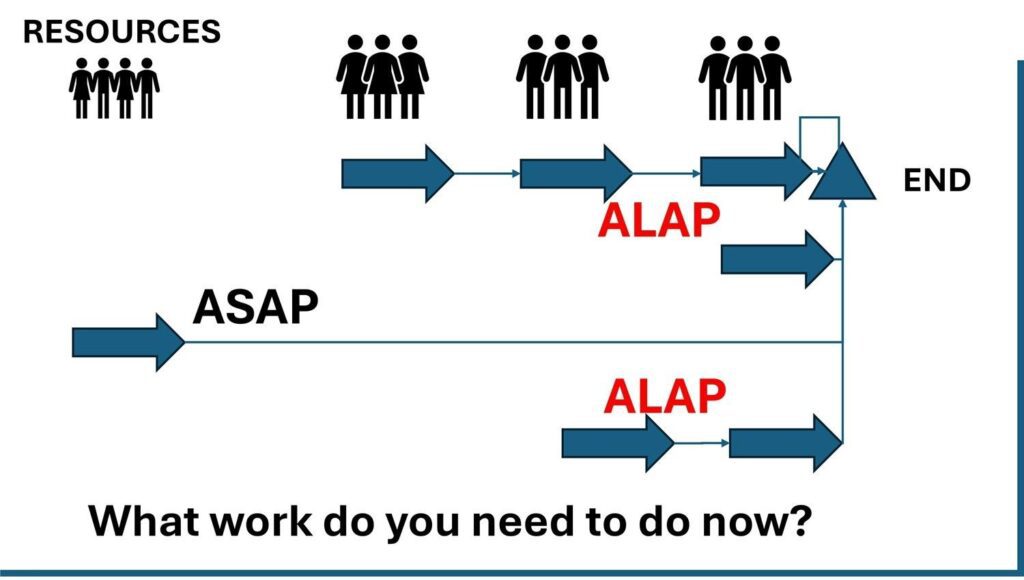
  • A mixed schedule. Mostly ASAP but with a few ALAP tasks can balance flexibility, cost control, and realism as illustrated in Figure 3.
Figure 3: A Schedule Using ALAP and ASAP

A Real-World Example

One of H&A’s senior scheduling consultants once faced this exact dilemma while helping to prepare a multi-year, multi-billion-dollar defense proposal for a project with strict annual funding limits. 

With less than two weeks before the submission deadline, the Proposal Director was exasperated: “I keep asking the engineers what can be delayed! Why does everything have to happen up front? The front-loaded schedule is blowing our funding cap!”

A quick inspection revealed the problem: every task was set to ASAP. The entire effort was jammed toward the beginning of the timeline, creating a massive early demand for resources. After several failed attempts to persuade the engineers to move work later, the consultant proposed something unconventional: “Let’s flip the question. Instead of asking what can we delay, let’s ask what must be done now.”

The H&A scheduling consultant converted the entire schedule to ALAP, instantly shifting all work to the far right of the timeline. The resulting view inverted the problem, from overspending early to under-spending, and gave the team a new way to discuss priorities.

In meetings, engineers were asked to move tasks from ALAP to ASAP one at a time, stopping when the annual funding limit was reached. The discussion changed from “Why can’t we do this now?” to “What can we afford to do this year?”

The result wasn’t elegant, but it solved the immediate problem: the funding limits were clearly observed, the resource profile became manageable, and the trade-offs were visible to everyone.

How ALAP Affects Critical Path and Risk

Because ALAP tasks consume all available float, they appear critical even when they may not truly drive the project finish. This can obscure the actual critical path, making it difficult for project managers to distinguish between genuine schedule risks and artificial ones. In Earned Value Management (EVM) environments, this matters. Earned value metrics depend on knowing which tasks drive completion. Excessive use of ALAP can lead to misleading forecasts and distort DCMA data quality metrics such as the Total Float test and the Critical Path test. For this reason, auditors often recommend using ALAP sparingly and documenting the rationale wherever it’s applied. 

Note: in a sophisticated scheduling environment, it is possible to make a copy of the integrated master schedule (IMS) and revert to ASAP to look for critical paths in the normal sense.  

Combining ALAP with Other Constraints

In practice, project managers often use a blend of constraint types. For example, you can combine ALAP with “Must Finish On” or “Start No Earlier Than” dates to simulate external dependencies such as contract milestones, funding release dates, or material delivery windows. This hybrid approach allows the schedule to model reality while maintaining logical control. However, it’s important to track these constraints carefully. Too many “hard” constraints of any type can reduce the schedule’s dynamic nature and make automated forecasting less accurate.

Guidance from Industry and Agencies

Industry and government scheduling guides consistently advise restraint when using ALAP. The DCMA data quality tests consider the presence of ALAP tasks as a potential red flag because they can mask schedule float and obscure the true drivers of program completion. Similarly, the GAO’s Schedule Assessment Guide recommends minimizing artificial constraints and using logic-driven sequencing whenever possible. ALAP may be appropriate for modeling constrained resources or fixed delivery milestones, but it should always be justified and documented. Within DoD and NASA programs, reviewers often require clear evidence that ALAP usage is intentional, controlled, and limited to well-understood modeling cases. It should never be used as a workaround for poor sequencing.

Key Takeaways

  • ASAP emphasizes early starts, clear float visibility, and traditional forward scheduling.
  • ALAP emphasizes delayed starts, tighter resource control, and is useful in backward or funding-constrained planning.
  • Use ALAP sparingly and intentionally as it can obscure float and create multiple critical paths.
  • In creative problem-solving, toggling between ASAP and ALAP can reveal insights about timing, funding, and necessity that might otherwise remain hidden.

Final Thoughts

The ALAP constraint is a powerful but double-edged tool. It can simplify discussions about funding limits, resource phasing, and timing priorities, but it also carries risk if used indiscriminately. Like most features in commercial off the shelf (COTS) scheduling tools, its value depends on the user’s intent and discipline. The best project schedules blend logic, transparency, and flexibility. Understanding when to use ALAP (and when not to) can make the difference between a reactive plan and a truly managed one.

Interested in Learning How to Use More Advanced Scheduling Techniques?

Master schedulers skilled at asking the right questions to solve project management challenges hone their craft based on years of experience and working with other scheduling experts. There are always opportunities to learn more. H&A routinely offers basic, advanced, and tailored scheduling workshops taught by senior master schedulers with decades of experience in all types of project environments using common scheduling tools such as Microsoft Project and Oracle Primavera P6. Give us a call today to get started. 

Humphreys and Associates also offers basic and advanced EVMS training as well as tailored EVMS training that aligns with a client’s EVM System Description. 

Understanding the As Late As Possible (ALAP) Scheduling Option in Practical Terms Read Post »

Establishing Milestones in the Integrated Master Schedule (IMS) Appropriately

, , , ,

The purpose of the Integrated Master Schedule (IMS) is to model and communicate the plan to accomplish a project’s objectives. A key part of that model is the identification of key events that are represented as milestones. The selection of these milestones should be done with consideration for its purpose – what does the milestone represent and communicate? You should be aware of the intent of each milestone that is entered into the IMS. The IMS is a critical communication tool to ensure everyone on the project has a common understanding of the project’s work flow. Too many times I have witnessed a scheduler slam a milestone into the IMS without regard to how it impacts the schedule logic. This could be due to haste but, in my experience, it is often due to a lack of understanding of the purpose of the milestone.

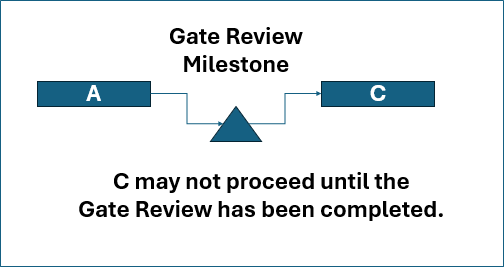
Figure 1 illustrates a common diagram for a milestone. 

Gate Review Milestone.  C may not proceed until the Gate Review has been completed.
Figure 1 Example of a Gate Milestone

As illustrated in Figure 1, the milestone is a gate and will hold up work in task C until the milestone is claimed as finished.

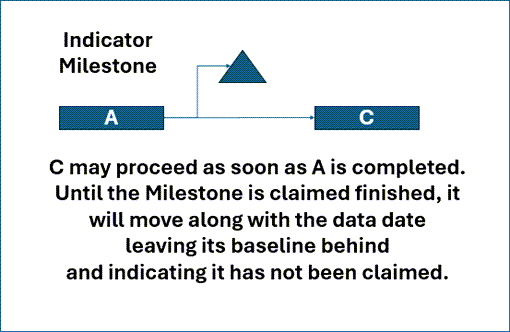
If the intent is to have the milestone act as an indicator instead of a gate, then the diagram in Figure 2 could satisfy that intent. If a successor is needed for the indicator milestone, something like the “End of Project” milestone could be added.

Indicator Milestone - C may proceed as soon as A is completed. Until the Milestone is claimed finished, it will move along with the data date leaving its baseline behind and indicating it has not been claimed.
Figure 2 Example of an Indicator Milestone

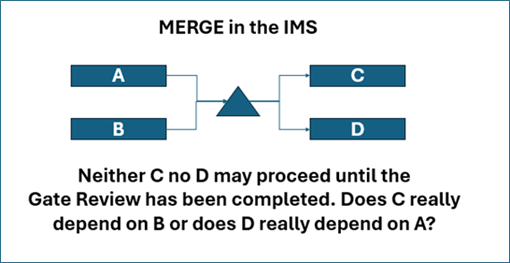
An accomplished scheduler knows the dangers of a Merge in the IMS. The Merge introduces schedule risk. Imagine the damage to the schedule risk assessment (SRA) if a Merge were entered as illustrated in Figure 3.

MERGE in the IMS - Neither C no D may proceed until the Gate Review has been completed. Does C really depend on B or does D really depend on A?
Figure 3 Example of Merge Risk in the IMS

In addition to adding risk, as the question indicates in Figure 3, the situation portrayed may not be true.

Is the purpose of a milestone clear to everyone?

What is the real purpose of the milestone? That must be defined first so the diagram can be entered properly into the schedule, and the IMS can model the correct steps for the project. Along with the definition of the purpose, the completion criteria should be defined and documented.

Unfortunately, this problem often extends to others on the project and even to those most responsible for the project – the Program/Project Managers (PMs). A case in point. Some years ago, a high-level customer PM challenged me, in my role as the contractor IMS architect, after the PM’s schedule subject matter expert (SME) expressed their concern that milestones in the IMS were being input incorrectly.

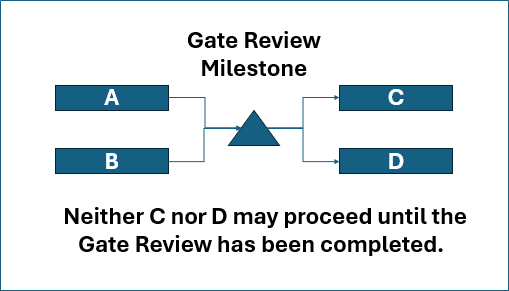
The milestone in dispute was the Preliminary Design Review (PDR). The PM and the PM’s schedule SME said the review was a gate and therefore should be modeled as illustrated in Figure 4. Note: In the real schedule, there were many more predecessors and successors to the milestone. Figure 4 simplifies the schedule content for clarity.

MERGE in the IMS - Neither C nor D may proceed until the Gate Review has been completed. Does C really depend on B or does D really depend on A?
Figure 4 Impact of a Gate Review Milestone

They both agreed that Tasks A and B were tasks to be done during the review itself and that the Milestone was to represent the satisfactory completion of the review. According to the definition of the PDR in the Integrated Master Plan (IMP) entrance/exit criteria, the review would lead to a letter of acceptance. The letter of acceptance was the definition of done in this case. When asked how long it would take from the time the review in A and B (and all predecessors) would be held until the letter was received, the answer was something in the order of weeks.

A literal reading of the IMS would go like this: “Hold the review in tasks A and B (and all predecessors) then wait for the approval letter before starting any other work.”

When asked if it was the PM’s intent for the several hundred engineers and others working on the project to put down their pencils after the review and wait for the letter while doing nothing as shown in PM’s desired version of the milestone in the IMS, the immediate reaction of the PM was shocked silence. Of course not. The project could not go on hold for even one week waiting for a letter. The teams would disband, and the workforce would be gone. Work would stop.

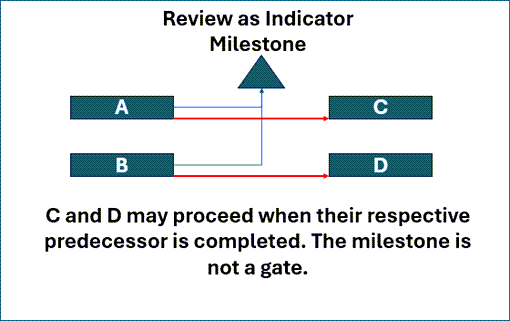
I then told the PM it was not the contractor’s intention to go parade rest and wait for the letter even if he had thought that was what was supposed to happen. If the review in A and B was deemed successful with some reasonable set of action items, then the teams would proceed. It might be that they would proceed on risk, but they would proceed anyway. I then showed the PM and the PM’s schedule SME how we would model the review in the IMS to show proceeding on risk. It would look like the example in Figure 5 if we implemented the milestone as an indicator milestone.

Review as Indicator
Milestone - C and D may proceed when their respective predecessor is completed. The milestone is not a gate.
Figure 5 Review as an Indicator Milestone

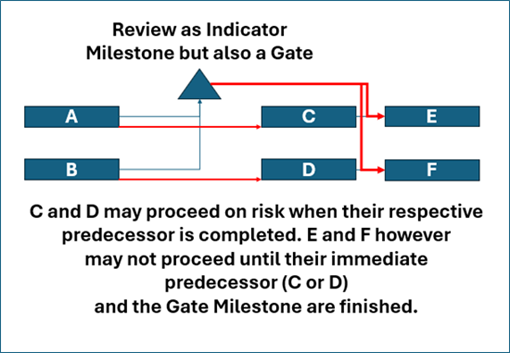
The PM thought that could work but was concerned there was no gate review aspect to this diagram and PM control of the project would be weakened or lost. I then showed him how we could put the review into the IMS as an indicator with a delayed gate effect. In other words, work would proceed while the letter was being prepared but would stop at some point if the letter was not received. That diagram looked like the example in Figure 6. 

Review as Indicator
Milestone but also a Gate - C and D may proceed on risk when their respective predecessor is completed. E and F however may not proceed until their immediate predecessor (C or D)
and the Gate Milestone are finished.
Figure 6 Review as Indicator and as a Gate

The letter could be prepared while the teams worked on tasks C and D. If issues arose then the teams would be compelled to stop after tasks C and D individually. In this case an issue with task C might not hold up task D and conversely, an issue with task D might not hold up task C. This was a measure of control the PM thought would be adequate when the need for the approval letter in the milestone was also added.

Talking Through the IMS to Verify the Intent of Milestones

The point is that the IMS is a model of the project that should define exactly what is supposed to happen. What exactly is the IMS telling us to do? Is the review a gate? Is it just an indicator? What do the documents and agreements say about the milestone? This is definitely not the time to quickly slam a milestone into the schedule logic without taking the time to think about its purpose or what you want to communicate to someone else on the project.

This story also highlights the importance of ‘reading’ or ‘talking through’ the IMS. When it was explicitly stated that the project would be put on hold if the schedule depicted in Figure 4 were followed, the team quickly realized the need for a better approach, leading to the development of a more effective plan.

Interested in Learning More?

There is an art and skill that is honed over time for creating integrated master schedules that accurately reflect the work to be performed and clearly communicates that plan to everyone on the project. There is always more to learn. H&A offers basic and advanced scheduling workshops taught by senior master schedulers with decades of experiences in all types of scheduling environments that can be tailored for the scheduling tools you are using. Give us a call today to get started.

Establishing Milestones in the Integrated Master Schedule (IMS) Appropriately Read Post »

Scroll to Top