PASEG

Survey of Schedule Acceleration Techniques

, , , , , , ,
Survey of 
Schedule Acceleration Techniques - An overview of schedule acceleration techniques discussed in the PASEG

The NDIA Integrated Program Management Division (IPMD) Planning and Scheduling Excellence Guide (PASEG) includes a list of the acceleration techniques that can be applied to reduce project schedule duration. That section of the guide provides the background for project team discussions on accelerating complex integrated master schedules (IMS) in government contracting environments. This blog is intended to increase awareness of the techniques in the guide and provide some additional insight into their application. It relies heavily on the guide’s content. 

An additional purpose of this blog is to promote the use of the NDIA IPMD nomenclature across the defense industry spectrum. In much the same way as the earned value management (EVM) acronyms of BCWS, BCWP, ACWP and others have become standard terminology, it would be beneficial to have a more standard way of discussing schedule acceleration techniques. As the PASEG is an industry guide developed and maintained in collaboration with U.S Government agencies, the PASEG promotes a common understanding of these techniques.

One caution. Modifications like the ones discussed here can introduce additional risk into the schedule and reduces flexibility. Be careful when modifying the schedule. A good practice is to first create a copy of the schedule and assess the effects of your changes before you adopt them. The trade-offs may or may not be acceptable depending upon the objective you want to achieve. If the schedule is the priority, there is likely to be an impact on the work scope or cost. There can also be unintended consequences when potential impacts are overlooked. 

Let’s review the techniques from the PASEG. 

  1. Crashing. 

The guide says “This technique allows for the acceleration of schedule by applying additional resources or more experienced resources to do the work in a shorter period of time. This method assumes that the task can be completed in a shorter amount of time with the increase in resources.”

We probably have all used this method when we are shopping on the internet and we are faced with the choice between receiving the item in 5 days or accelerating that to 3 days or even the next day. We are paying more to get it faster. But what is really happening behind the scenes? Do they pick your order first? Do they pack it first? Do they ship it on faster carrier? Those are the actions you would be considering on your project when you want to accelerate something by crashing the schedule.

Using outside or contract labor is a form of this where we boost our workforce for a period when we need extra effort. A form of this is offloading some work to a subcontractor.

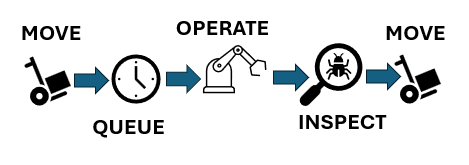
A more detailed example comes from the factory setting where certain orders are “expedited”. What that might mean is that the normal movement process is subverted. The normal process might be as shown in Figure 1 with a queue time while your order waits for the machine. The machine will be torn down and set up for your work when it is most efficient to do so.

Process with wait time
Figure 1: Process with wait time

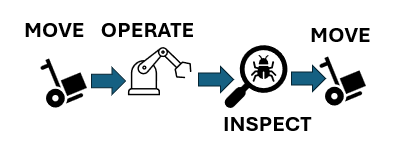
When you crash this process, you might simply remove the queue time so that as soon as your order arrives the machine is torn down and set up for your job to eliminate the wait time as shown in Figure 2.

Process with wait time eliminated
Figure 2: Process with wait time eliminated

However, using this approach is likely to increase cost and has the potential to introduce other risks to the project. A real-world example comes from the semiconductor industry where the factory was running both standard products and custom products. A normal custom order time of 8 weeks was cut to 2 weeks by using this approach. The cost that was charged to the customer for the rushed custom order was about 10 times the normal cost of an order to repay the factory for lost efficiency. 

  1. Fast-tracking.

The guide tells us “This technique accelerates the plan by performing work in parallel. With this method, extra attention needs to be put on resource de-confliction to ensure resources are not over allocated.”

We have all used this technique and probably had mixed outcomes. It seems simple and attractive. It embodies a “just get it done” mentality. If there are sufficient trained and capable resources then this can work. The resources can be used on both efforts at the same time. If that is not the case, then basically we would have to revert to pushing effort out of the way for another effort. This type of modification can introduce additional risk that may need to be mitigated.

  1. Streamlining.

The guide defines this technique in this way: “This technique depends on the team’s ability to find an alternate and more efficient completion methodology for the task/s. This includes reuse, innovation, and possibly eliminating non-value-added work. With this method, the program has to weigh the level of potential risk involved with these choices. Make sure that this does not drive a “run to fail” mode on the program. Ensure that tasks are meeting the full requirements and scope.”

Here we really need to be careful. In some cases, we might be working with specifications or requirements that demand a certain approach and cannot be changed or waived. Then we need to ask the question, “If there is a better way, why didn’t we assume that in the first place?”

In some cases, we might find this approach fits in with opportunity management. Maybe there is new software or a new machine available that can speed things up and still get things done correctly. We have all been in that situation; just remember the last time you went through a Windows upgrade. Did that go smoothly for you? 

In the area of software in particular, we must be aware of the entire ecosystem of tools we use and consider that any new tool applied in a hurry can result in problems. Case in point: one large contractor shifted from 2D drawings to 3D models to speed up and improve the processes, however not all the key suppliers were able to receive and use 3D models. The supply chain broke. Mom and Pop at the M&P Shop could not understand the new work orders. 

  1. Focused Work.

The guide describes focused work like this: “This technique employs the program management team to help in reducing multitasking and to remove barriers for the personnel on the program that are working critical and near critical program tasks. This method requires the program culture to adapt and “protect the critical/driving path” and to support the people that are working those efforts. This also requires the program manager to perform daily barrier resolution.”

A discussion on multi-tasking might be fun here, but we will assume for this blog that multi-tasking pulls resources away from tasks to do other selected tasks and that is not always the best approach. The big question here is what happens to the other efforts on the project when we focus on certain tasks. This technique can work well but only if we are aware of the impact to the other work and manage that work as well. Risk can be increased by adopting this approach so be alert. If we really are just removing barriers then we can benefit from this method. If we are just pushing aside other efforts to concentrate on this one, we need to know that and handle all the work properly.

  1. Calendar Adjustment.

The guide tells us, “This technique accelerates the plan by changing the amount of working hours available each day or working days available each week. This method is possible only if the resources and task location support working the increased work periods. Attention needs to be put on resource de-confliction to ensure resources are not over allocated.”

This is possibly the most attractive technique. Who has never had to resort to overtime to get something done? It is common to work extra hours, even over some weekends to get back on schedule. To a schedule practitioner, the calendar adjustment wording refers to the calendar in the scheduling tool and how it can be changed to add time in a day or convert non-working days to working days. 

This approach is not free. Overtime costs more than regular time and added shifts bring added costs. You should be aware you need to make a trade-off to determine whether the cost can be justified.

  1. Delay or Descope.

The guide advises, “If other techniques are not a viable option and the resultant schedule delay impact is unacceptable, an option exists to propose delaying or removing the selected scope.”

Notice the use of the word “propose.” Working on a contract may not afford the opportunity to eliminate work or consciously delay work. Coordination with the customer is required. Depending upon the customer’s immediate needs, they may be willing to take a more flexible approach to which work scope items can be delivered in a given time frame when they need to deploy something quickly. 

The PASEG goes on to tells us about things to promote and things to avoid. Those discussions are informative and useful. You are encouraged to obtain a copy of the PASEG and learn more on your own. More than that, you are encouraged to use this terminology and spread the use of it so that adoption spreads. 

Interested in learning more? The H&A Three Day Project Scheduling Workshop includes content on schedule acceleration techniques as well as managing schedule risk. This is a standard public workshop. Many of our clients schedule an in-house workshop that is specific to the scheduling tools they use such as Microsoft Project or Oracle Primavera P6. Call us today to get started.

Survey of Schedule Acceleration Techniques Read Post »

Video Release – Assessing Schedule Risk Using Deltek’s Acumen Risk 6.1 | Part 2 of 2

, , , , , , , , , , ,

The conclusion of our review of the foundational elements of performing a schedule risk assessment (SRA) using Acumen Risk 6.1

0:17 – Risk Exposure Chart
1:03 – Tornado Chart
2:14 – Parting Thoughts

Read the blog post at:

Assessing Schedule Risk Using Deltek’s Acumen Risk 6.1 | Part 2 of 2

Video Release – Assessing Schedule Risk Using Deltek’s Acumen Risk 6.1 | Part 2 of 2 Read Post »

Video Release – Assessing Schedule Risk Using Deltek’s Acumen Risk 6.1 | Part 1 of 2

, , , , , , , , , , ,


How confident are you that your project will finish on time? Review the foundational elements of performing a schedule risk assessment (SRA) using Acumen Risk 6.1

2:22 – Schedule Health Diagnostics
4:55 – Duration Uncertainty
6:35 – Risk Events
8:20 – Simulation Process
 
Read the blog post at:

Assessing Schedule Risk Using Deltek’s Acumen Risk 6.1 | Part 1 of 2

Video Release – Assessing Schedule Risk Using Deltek’s Acumen Risk 6.1 | Part 1 of 2 Read Post »

Assessing Schedule Risk Using Deltek’s Acumen Risk 6.1 | Part 1 of 2

, , , , , , , , , , ,

Why Perform Schedule Risk Assessments? EVMS and Agile implementations within the same company or on the same project.

Before a project is ready to be baselined, a typical question the customer asks the project manager is, “How confident are you that the project will finish on time?”

This is a more difficult question than you might think.  In competitive environments, guessing is not an option.  The probability of success on a project must be quantified.  The risks that impact the odds for success must also be quantified.  If the risk is managed, the probability of completing the project on time and under budget is improved.

Customers are not blind to the importance of risk management.  This is evidenced by recent changes in government contracting requirements that call for formal risk assessments of project schedules.  Even if risk management were not a contractual requirement, it would be irresponsible for any project manager to ignore the need for risk management and proceed without identifying and assessing the project’s risks.

Schedule risk exists in every project.  This risk can be quantified, analyzed, and mitigated, or it can be ignored.  However, ignoring schedule risk does not make it go away.  Fortunately, there are advanced software tools, such as Deltek’s Acumen Risk, that can help model the expected impacts of risk in the schedule. Then, the answer to “how confident are you that the project will finish on time?” can be answered with quantifiable information.

In the following sections, a few of the foundational elements of performing a schedule risk assessment (SRA) using Acumen Risk 6.1 will be discussed.  The software was designed with the understanding that not everyone is an expert in schedule risk analysis.  The software provides beginners with an easy to follow path to perform in-depth schedule risk analysis as well as advanced features for experienced risk experts.

Along with quick start guides and help documentation, the menu structure is laid out like a schedule maturity timeline.  From left to right, the menu selections take one from the start-up steps of importing the schedule, to analyzing the schedule, assessing schedule risk, accelerating the schedule, and advanced customization features.

Deltek_Acumen-Top-Level_MenusDeltek Acumen – Top-Level Menus


Schedule Health Diagnostics

Before delving into schedule risk assessments, let’s take one minor detour from risk into schedule diagnostics.

Would you trust a broken watch to tell you the correct time?  The same goes for a schedule risk assessment.  A broken schedule network cannot be trusted to yield reliable, and therefore actionable, SRA results.

The National Defense Industrial Association (NDIA) Integrated Program Management Division (IPMD) Planning & Scheduling Excellence Guide (PASEG), is widely regarded as one of the premier references on scheduling best practices.  The PASEG was created by a joint team of both government and industry scheduling experts, thus it has no particular point of view to promote or defend.  One of the scheduling best practices the PASEG discusses is that the integrated master schedule (IMS) should be validated before any SRA is performed.  “Validated” means that the tasks, logic, durations, constraints, and lags in the IMS should be analyzed and corrected as necessary.

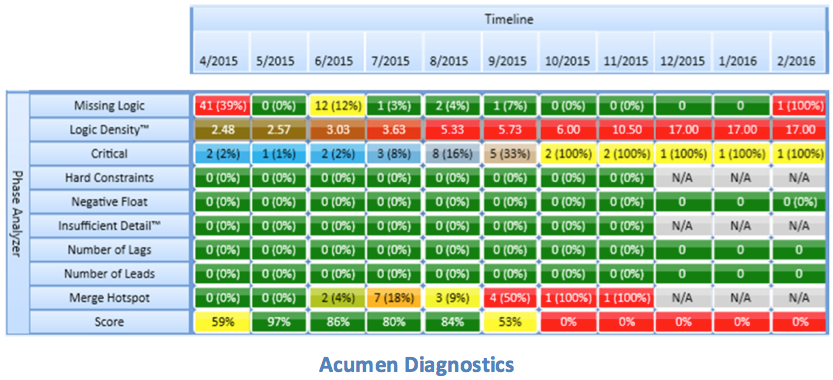
Acumen Fuse provides a complete set of schedule diagnostics.  When I first clicked on the “Diagnostics” tab, I saw an initial set of metrics.

EVMS: Acumen Fuse Schedule diagnostics

Each one of these metrics was applied to the project’s timeline that which makes it easy to see both where and when the issues occur.  What I did not notice at first was that these metrics were just one subset; I was only looking at the “Schedule Quality” subset of the diagnostics.  There were similar subsets in the areas of Logic, Duration, Constraints, Float, and the DCMA 14-point Schedule Assessment, just to name a few.  All of these diagnostic tests can be modified to reflect your company or customer’s standards.

Before leaving the topic of schedule health, there are a few words of caution.  No matter how useful a schedule analysis tool may be, there is no substitute for the task managers taking ownership of the IMS and ensuring that it is in good working order.  For example, analysis software can be used to check to determine if a task has a predecessor and a successor, but only someone familiar with the effort can determine if a task has the “correct” predecessor and successor.  Analysis software is becoming more and more sophisticated, but people still control the success or failure of the project.

Duration Uncertainty

Once a sound schedule has been developed, the next foundational elements of an SRA are the duration uncertainty estimates.  There are two widely accepted methods of assigning duration uncertainty.

The preferred and more precise method is to obtain three-point duration estimates (best case, worst case, and most likely) from the task owners.  At a minimum, this should be performed on all critical and near-critical tasks (and driving and near-driving tasks supporting significant events).  For larger schedule networks, it may not be reasonable to gather this type of information for every task.  If custom three-point estimates are not available, templated duration uncertainty could be applied based on the type of work, the task owner, historical performance, or any other applicable task characteristic.

Acumen Risk handles both methods very easily.  Custom three-point estimates can be entered for each task in days (or hours), or as a percentage of the current remaining duration of the task.  Standard duration uncertainty templates are easily applied to a task by selecting the appropriate risk level on the calibration bar.  To streamline the process, by setting the calibration at any summary level, the uncertainty template is cascaded down to all the “children” tasks.

Description. Calibration.

Risk Events

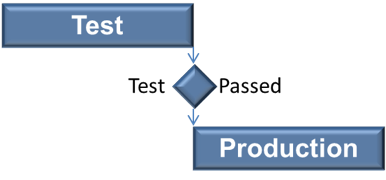
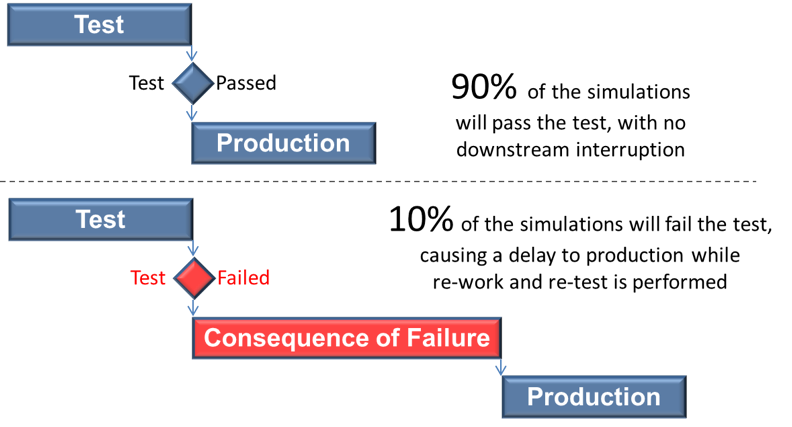
One thing traditional Critical Path Method (CPM) networks do poorly is model unexpected results.  For example, if there is a 90% success rate on fatigue testing, the IMS will generally be constructed to assume the test will be successful, with no disruption to downstream tasks.

EVMS: Critical Path Method

But what happens if the test fails?  While unlikely, there is still a very real possibility that the results will be unfavorable.  If the test does return unfavorable results, there will likely be a significant delay while re-work is performed in the areas of design, build and test.  A traditional CPM network can model a successful test or an unsuccessful test, but not both.  This is not a problem with a schedule risk assessment.  Information from the project’s risk register can be used to model the likelihood of a test failure, as well as the consequence, or delay to downstream tasks resulting from that failure.

EVMS: CPM Risk Events Consequence

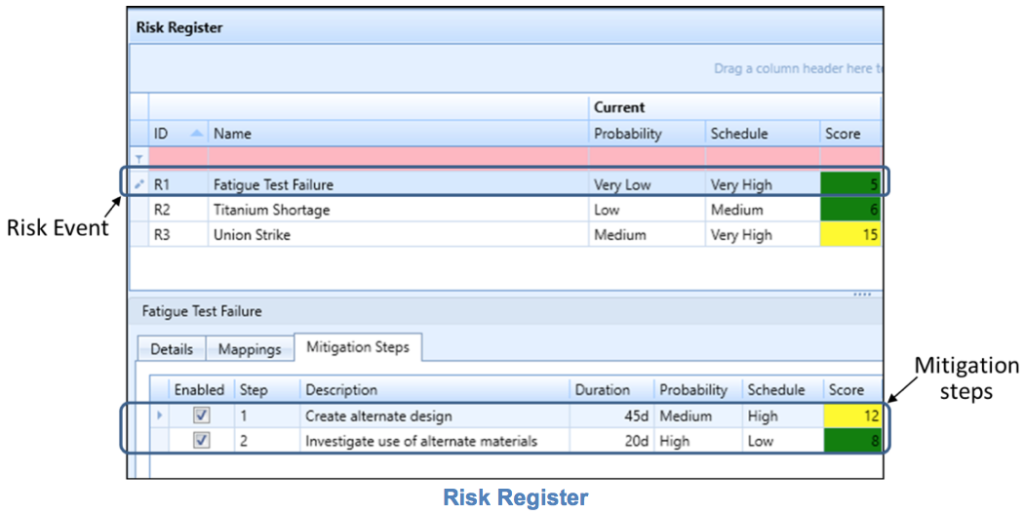
Is this an acceptable risk?  An SRA can quantify the risk and provide information on the likelihood of successful deliveries.  Acumen does not stop there though.  One of its newest features is to organize and track all risk events within its built-in risk register, as well as to track the steps being taken to help mitigate that risk.  Or, if your organization already maintains an external risk register in Excel, it can be imported into Acumen to eliminate the duplicate tracking of risk events.  Whether the risk register is imported from Excel or built from scratch within Acumen, a single risk event can then be mapped to one or more activities, or a single activity can be associated with one or more risk events.

EVMS: risk registers 


Simulation ProcessEVMS: Simulation Process

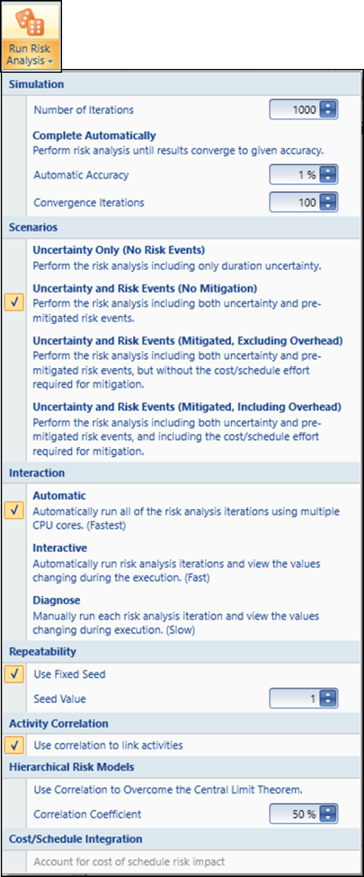
A typical SRA uses Monte Carlo techniques to simulate hundreds or thousands of potential project outcomes using the risks and uncertainties that have been supplied.

For most users, simply accepting the default settings and pushing the “Run Risk Analysis” button would be sufficient.  But if terms like “Convergence”, “Correlation Coefficient”, “Central Limits Theorem” and “Seed Value” are part of your normal working environment, Acumen provides a variety of settings that can be customized to tune the SRA to best model your project.

No matter which approach you take, the Acumen toolset provides a quick and easy simulation process.


What to Expect in Part 2

Part 2 of this blog will delve into the interpretation of SRA results.


Yancy Qualls, PSP

Engagement Director, Schedule Subject Matter Expert (SME)

Humphreys & Associates, Inc.

Assessing Schedule Risk Using Deltek’s Acumen Risk 6.1 | Part 1 of 2 Read Post »

Management Reserve; Comparing Earned Value Management (EVM) and Financial Management Views of “Reserves”

, , , , , , , , , ,
Management Reserve & Earned Value ManagementPerhaps you have witnessed the collision of earned value management’s views on “management reserve” with the Chief Financial Officer (CFO) and the finance department’s views on “balance sheet reserves.” Most companies tend to organize EVM, the function, reporting to either the programs’ organization or to the finance organization. Either will work but either can fail if the two organizations do not understand the interest of the other.

In this article we will outline three areas. The first will be EVM and Management Reserve (MR). The second will be finance and balance sheet “contingencies, loss provisions, or reserves.” The third will compare the two views and identify where they are similar and where they differ.

We will use two terms for both EVM and Financial Management; “in play” and “on the sideline.” “In play” for EVM means that it is in your Performance Measurement Baseline (PMB) and Budget at Completion (BAC). “On the sideline” for EVM means “not in scope” therefore in MR. “In play” for financial management means recorded on the balance sheet (e.g.: current liability; an accrued liability). “On the sideline” for financial management means not recorded on the balance sheet, because it is more likely than not that a liability has been incurred.   If material, however, it will likely be disclosed in the notes to the financial statements, even if it is not recorded on the balance sheet.


Earned Value Management and Management Reserve

A program manager and his or her team must deal with – mitigate – risk or be consumed by those risks as they become issues. There are two types of risks, known and unknown. The known risks are entered into a risk register, and their likelihood and consequence are determined. Mitigation for those known risks is done at the activity level in a program’s Integrated Master Schedule (IMS) (Planning and Scheduling Excellence Guide — PASEG page 141, ¶ 10.3.1). Mitigation of known risks is part of the PMB (in the BAC) and is therefore “in play.”

The second type of risk – unknown or unknowable risks – are covered by management reserve if within the Scope of Work (SOW) of the existing contract. If contractor and customer conclude that the realized risk is outside the existing contract, then an Engineering Change Proposal (ECP) would likely be created by the contractor; and a contract modification would be issued by the authorized customer contracting officer if they agreed.   The program manager should ask this question of his team: what work is “at risk” and what work is not “at risk?” Does labor or material present more risk? Management reserve “is an amount of the overall contract budget held for management control purposes and for unplanned events” (Integrated Program Management Report–IPMR DI-MGMT-81861 page 9, ¶ 3.2.4.6). Management reserve is “on the sidelines.” MR has no scope. MR is not earmarked. MR stands in waiting.


Earned Value Management Reserve (MR) Compared To Financial Management “Contingency”

Because the audience reading this blog is most likely from the EVM community, I’ll offer a Financial Management example of a company that faces many risks and must manage those risks or be consumed by them. Altria Group, Inc. and Subsidiaries (stock symbol: MO) are in the tobacco, e-Vapor and wine business. Altria’s history clearly shows that the company measures and successfully mitigates the risks they face. Altria faces a blizzard of litigation each year and must protect its shareholders from that risk. So how does Altria manage known risks (mostly from litigation) and how does Altria handle unknown risks?

Altria is a publicly traded company and its annual report (10K) is available on-line to the public. This data is from their 2014 annual report.

I am an MBA, not a CPA, so I’ll stick to Altria’s 2014 balance sheet. For those not familiar with financial statements, a balance sheet has on its left hand side all of a company’s assets – what the company owns and uses in its business (current assets = cash, accounts receivable, inventory; long term assets = property, plant and equipment). The right hand side of a company’s balance sheet shows current and non-current liabilities and shareholders’ equity. The top right hand side of the balance sheet includes current and non-current liabilities (accounts payable, customer advances, current and long-term debt, and accrued liabilities like income taxes, accrued payroll and employee benefits, accrued pension benefits and accrued litigation settlement costs) and the bottom of the right hand side of the balance sheet includes shareholders’ equity consisting of common and preferred stock, paid in capital and retained earnings.

Altria’s 2014 annual report shows under current liabilities; accrued liabilities; settlement charges (for pending litigation Contingency note # 18) a value of $3.5 billion dollars. The 2013 amount was $3.391 billion dollars.

So Altria has “in play” $3.5B for litigation for 2014. In financial terms, Altria has recorded $3.5 billion in expense related to the litigation, probably over several years as it became more likely than not that a liability had been incurred and was reasonably estimable. In EVM terms Altria has $3.5B in their baseline, or earmarked, or in scope for litigation (court cases).

What happens if Altria ultimately has more than $3.5B in litigation settlement costs? What does Altria have waiting on the “sidelines” to cover the unknown risks? Essentially Altria has on its balance sheet waiting “on the sidelines” $3.321 billion in cash and the ability to borrow additional funds or perhaps to sell additional shares of stock to fund the settlement costs. In EVM terms Altria has $3.5B in its baseline (on its balance sheet) to manage the risks associated with litigation. Altria’s market capitalization at the market close on May 17, 2015 was $52.82 billion and its 2014 net revenues were $24.522 billion. It is reasonable to understand that Altria has more than enough MR.


Differences Between EVM MR and Financial Management Balance Sheet Reserves

In EVM, MR is only released to cover unplanned or unknown events that are in scope to the contract but out-of-scope to any control account. A cost under-run is never reversed to MR, and a cost over-run is never erased with the release of MR into scope.

In industry in general, and Altria in particular, if the “in play” current liability for settlement charges of $3.5B are not needed (an under-run), then Altria will reverse a portion of the existing accrued liability into income, thereby improving profitability. If Altria’s balance sheet reserve of $3.5B is insufficient, then Altria’s future profits will be reduced as an additional provision will be expensed to increase the existing reserve (an over-run).

[Humphreys & Associates wishes to thank Robert “Too Tall” Kenney for authoring this article.]

Management Reserve; Comparing Earned Value Management (EVM) and Financial Management Views of “Reserves” Read Post »

Scroll to Top