EVM Advanced Concepts

EVM (Earned Value Management) vs. Agile Project Management

, , , , , , , , , , , , ,

This article provides an introduction to the differences between an Earned Value Management System (EVMS) and Agile approaches on projects, and isolates the challenges of implementing an EVMS on a project where the project management has chosen to follow an Agile approach to the development work. The article explores the principles of EVMS and of Agile, and contrasts them to show where there are inherent conflicts. The article then discusses how the conflicts can be mitigated so that the benefits of both the EVMS and Agile can be obtained from a joint implementation.

Controlled Planning with EVMS

Controlled Planning with EVMS

Earned Value Management (EVM) Background

Earned Value Management is a 50 +/- year old methodology based on widely accepted principles that applies documented, systematized practices to support the processes of organizing, planning, directing, and controlling large complex projects, of any nature, which contain a high degree of uncertainty.

An EVMS is structured compliant to 32 guidelines that define what a project management information system should be capable of doing to support the program management team. Within the 32 guidelines there is a subset of generally recognized core principles. The core principles are:

  1. Organize the entire scope of the project using a Work Breakdown Structure (WBS).
  2. Organize the project team using an Organization Breakdown Structure (OBS).
  3. Integrate the project work with the project team to create management control points (Control Accounts).
  4. Schedule the project work in the Control Accounts across the entire project duration at the appropriate level of detail.
  5. Establish time-phased budgets for the scheduled work in the Control Accounts.
  6. Establish the scope/schedule/budget baseline as the Performance Measurement Baseline (PMB).
  7. Authorize the scope/schedule/budget and control the start/stop of work.
  8. Periodically measure the schedule and the value of completed work and determine the Earned Value.
  9. Record direct costs (actual costs) and summarize into the Control Accounts.
  10. Compare planned, accomplished, and spent to analyze the performance and associated variances.
  11. Develop realistic time and cost estimates for the remaining effort in the Control Accounts.
  12. Rigorously control changes to the Performance Measurement Baseline.

The EVM concept presented in these guidelines is a sound management approach, that once incorporated on any type of program, whether research and development, construction, production, etc. provides all levels of management with early visibility into cost and schedule problems.  Earned Value Management now appears as a contractual requirement on programs world-wide.  Primary EVM users include the United States, Europe, England, Canada, Australia, China, and Japan. It is a requirement of many U.S. Government agencies, including the Department of Defense (DoD), the National Aeronautics and Space Administration (NASA), the Department of Energy (DOE), the Intelligence Community, the Department of Homeland Security (DHS), the Federal Aviation Administration (FAA), the Department of Transportation (DOT), Health and Human Services (HHS), and others.

EVMS has been adopted by companies in situations where it is not a contractual requirement so that they can gain the discipline and benefits of the structural management approach discussed in the guidelines.


evms 2

Flexible Planning with Agile

Agile Background

Agile is a 20 +/- year old approach to applying a mindset that values the use of small, empowered, self-organizing, multi-functional teams, mainly in software development, to establish a test driven product development effort. This uses a series of short, rapid incremental builds within projects with a high degree of uncertainty to achieve shorter development times, lower costs, and products more closely aligned with customer requirements.

Agile does not usually appear as a contractual requirement. The concept is adopted by companies and organizations with the belief that a better product will be produced faster, and with less expense, using this approach than if traditional approaches were followed.

There are a core set of principles for Agile that were initially established in the copyrighted Agile Manifesto. These delineated core principles are:

  1. Early and continuous product delivery.
  2. Deliver working software (product) frequently.
  3. Expect change and respond positively to change.
  4. Developers and project business organization (PMO) work together.
  5. Product-focused build teams are at the core.
  6. Support self-organizing teams – trust among peers.
  7. Encourage face-to-face discussions (involve the user/customer).
  8. Working software is the measure of progress.
  9. Maintain a constant sustainable pace of development.
  10. Simplify the process and the product.
  11. Put the highest value on technical excellence.
  12. Improve team effectivity.

So How Does Agile Work?

The Agile mindset or approach is implemented through a process of defining the product backlog into smaller and smaller subsets of work that are structured in a top down fashion. At the lowest level of product backlog, the work elements or requirements can be prioritized and assigned to teams. The self-organizing teams pull work from the backlog and work the tasks to completion in a series of short, time-fixed Sprints or iterations. Sprints are often from 2 to 4 weeks long.

Because the teams are self-organizing, there is no team manager or team lead. The teams work as a group and only pull from the backlog at the last possible minute, and do minimal planning for each Sprint. If the product backlog is properly deconstructed and defined into user stories, then the planning meeting for an entire 4 week Sprint can be accomplished in a few hours.

The teams design, code, test, integrate, and deliver functionality in every Sprint. Since tested product is output every few weeks, all on the project can see the product being created and can contribute along the timeline, as needed, to provide a complete finished product.

The product owner embodies the customer’s perspective and either accepts or rejects the team’s work.  At the latter point of each Sprint, the tested product is demonstrated to the product owner.

High Level Side-by-Side

The two approaches are contrasted in the chart shown below. The EVMS is a methodology that is highly documented and highly systematized, while Agile is just the opposite. It is more of a mindset than a methodology with the preference not to have significant process documentation.

The EVMS is applied to entire projects and contracts, while generally Agile is applied to software portions of projects.  However, it could also be used on other development work.

The EVMS is usually a contractual requirement with significant implementation and operation constraints while Agile has none of these. As a contractual requirement, the EVMS carries with it the option for customer reviews and the threat of non-compliance, which entails penalties.

EVM Agile
Methodology Mindset
Documented Self-defined
Systematized Self-defined
Any type of project Software development (mainly)
High degree of uncertainty High degree of uncertainty
Applied to the entire project Applied to portions of the project
Often a contractual requirement Adopted not required

Lower Level Side-by-Side

In addition to the high level side-by-side, there are significant differences within the details of the two approaches. These are shown in the side-by-side table below.

Agile EVMS
Minimal documentation More documentation
Plan at last moment Plan ahead to end of project
Scope is flexible Scope is baselined and controlled
Expect and embrace change Avoid and/or control change
Schedule (Sprint) is fixed.  Timebox ends the Sprint. End the package when the work is done.
Budget is secondary Budget is baselined and controlled
Cost collection is not mentioned. Cost collection at the right level is critical

Accommodate and Capitalize on Differences

It is possible to implement Agile along with an EVMS if the EVMS application is set up to accommodate the differences and capitalize on them.

For example, the main reason that Agile’s embrace of change is a potential problem within an EVMS is because often the EVMS is used to plan too far in advance, and then reacting to change is difficult and expensive. If short term planning in the EVMS can be coordinated with the Agile planning, then the two can coexist.

The Agile free acceptance of scope changes within the backlog runs counter to the EVMS imposition of baseline change control. But if the EVMS baseline can be carefully set at a work level above the busy lowest level ups and downs, the impact to baseline change control is manageable.

A surprising chance to capitalize on Agile, within the EVMS, is found in the Scrum team approach in Agile where the team breaks work down into tasks far below what would normally be done in an EVMS, and then meets daily to update progress and provide corrective action. This low level constant attention means that the EVMS benefits from a better look at real progress as assessed by the real performers.

Not all the compromise needs be on the EVMS side of the equation. The Scrum team operations will often be defined to have the least possible recording of what happens during the Sprint. Since the product is king, then only the product really matters. But that misses the opportunities to capture the actions of the team for analysis, and use in upgrading their skills later. Necessary compromises would include some additional recording of the daily actions of the team and capturing the progress and problems. These would then be used in the EVMS functions of performance measurement, variance analysis, and corrective action planning.

One other compromise in the Agile realm that would be needed is the adoption of some minimum documentation of processes so that team operations can be repeatable and stable. Even a self-organizing team cannot change the way they work every time it wishes. That would raise the risk of a chaotic work environment.

These topics are recapped in the table below.

Agile EVMS Accommodation
Scope is flexible Select a higher level package for the baseline
Change is expected and embraced Have the shortest possible planning horizon
Plan at the last possible minute Have the shortest possible planning horizon
Daily Scrum Stand-up Meeting Collect the data and use it for performance measurement
Sprint Review Meeting Use for periodic measurement and analysis
Sprint Retrospective Meeting Use in Corrective Action Plans
Lack of documentation Add minimum documentation to stabilize team operations

Bottom Line

Implementing an EVMS is a challenge itself. Implementing Agile is a challenge too; perhaps a more difficult challenge. Implementing the two approaches side-by-side can seem impossible. But it is possible and even beneficial if done in a way the makes needed accommodations in both arenas for the project’s benefit.

EVM (Earned Value Management) vs. Agile Project Management Read Post »

Guidelines for Schedule Displays

, , ,

EVMS & SDG: Schedules Display Guidelines for Organized Diplays and Earned Value Management

An Organized Approach to Improving Schedule Displays

Paul F. Bolinger 7/1/2014


This paper was originally published in the College of Performance Management’s Measurable News, third quarter 2014.

This paper establishes a set of guidelines to improve the display of schedules.

Research into human perception has brought an understanding of the ways that information display can be improved to speed up recognition and provide clarity. The guidelines presented here focus only on schedule information displays and are based on research by authors Colin Ware and Stephen Few [reference]. An example schedule display is developed as part of the paper to help the reader understand the application of the guidelines.The goal of displaying information is to aid the thinking of the reader. Research by Ware and Few informs us that there is some “pre-attentiveperception [reference] processed by the eye-brain combination. This is subconscious perception. The faster this front-end perception is accomplished, the faster overall perception and then cognition can be accomplished. In other words, the faster the reader can start to think about the meaning of the schedule. If the display is set up so that the reader just “gets it” without having to go piece by piece through the details, then the reader can move quickly on to their thought processes about the schedule. This paper is part of the effort to develop and disseminate the practice of building better top level executive type summary schedules for major projects.

Too often, large amounts of time and effort are put into project planning and scheduling only to be unavailable for, or hidden from, general usage by the obscurity of the systems used and the lack of neat clean ways to provide quality graphical schedule information at the project summary level. There are already tools available to build high impact top level schedules linked to the detailed networks below; now we have guidelines to help us use those tools to make our schedule displays even better.

The Schedules Display Guidelines (SDG)

In this paper, we will look at some defined guidelines and examples of what should be best practices in displaying schedules. Each schedule display guideline [SDG] has been derived from underlying research into human perception and processing of visual information. Colin Ware & Stephen Few have written very important works about information display, and Ware has published a set of guidelines on display of information in general. This paper adopts the guideline approach Ware used effectively, and specifically applies those guidelines to the display of schedules.

Each schedule display guideline will be stated, explained, and supported with an example. The assumption is that these schedules rest upon a disciplined lower level set of high quality schedules that meet the generally accepted scheduling guidelines (GASP). We are focused on the display of schedule information, not on the scheduling techniques and measures.

Guidelines and Supporting Arguments

[SDG 1.0] Identify the intended viewers of the schedule and prepare the display accordingly. Each audience can have a different level of interest in a project or program schedule. The right display approach for one audience can easily be totally wrong for another. For top level schedules, the display should present summary material relevant to the needs of the audience.

Some examples of target audiences are:

  1. Customers – who are interested in understanding the project from their point of view; when do they get what they ordered and what is their involvement.
  2. Company executives – who are interested in understanding the project and having a tool (the schedule) to use to inform others about the project.
  3. Project Team – who are interested in having a useable and understandable road map they can refer to as they proceed along the path to the goal.

The example provided later in this paper will be for customer executives intended to help them to follow progress and to explain the project to others. These executives want a one page overview schedule linked up from the detailed electronic schedules that they can confidently use to brief others on their project.

[SDG 2.0] Identify the environment; what is it you are going to describe in your schedule. Questions you must resolve before you make key decisions about the display are; will you be dealing with multiple projects, a single project, a single project with multiple goals, a single project with multiple high-level players like team mates or subcontractors, multiple phases of a project, a short period or a long period?

The example provided later in this paper is a single project for a U.S. Department of Defense customer. It will span multiple years and include design, fabrication, assembly, testing and support efforts to document the system. This is not a real project but represents the type of challenges found in real projects.

[SDG 3.0] Understand the project you are going to display. What is unique about the project? What message needs to be given to help the viewer understand the project? Remember that important details are obscured in the network centric scheduling software; the summary level schedule is the place where crucial components can be highlighted and emphasized.

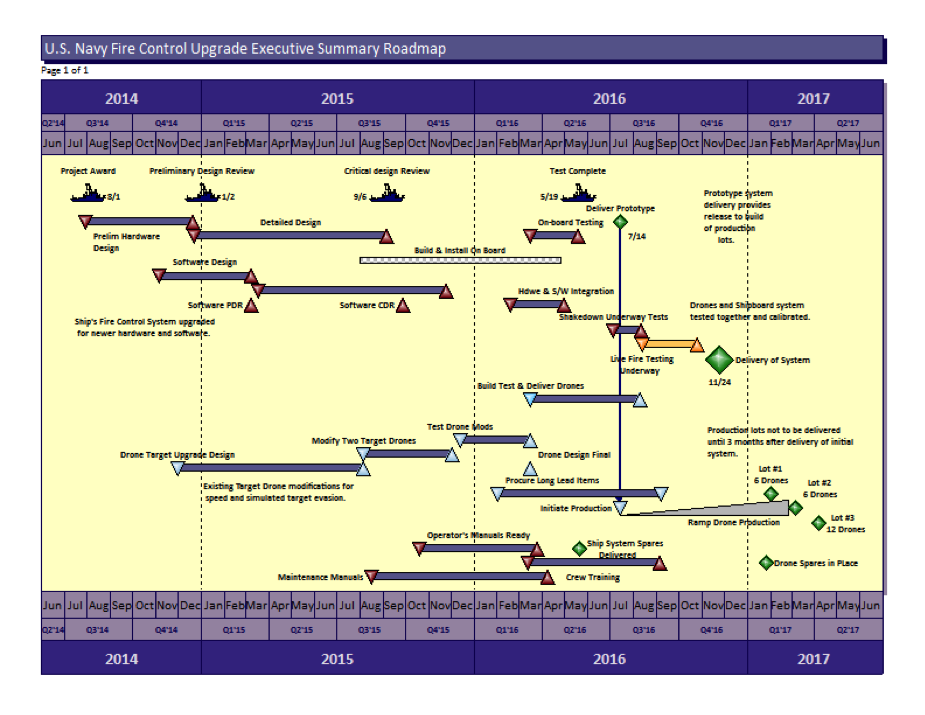
The example project provided later in this paper is one in which a shipboard fire control system, consisting of hardware and software components, will be upgraded to meet new threats. Running parallel to this effort, the target drone fleet will be upgraded to be able to simulate the new threats. The shipboard modifications and the upgraded drones will be performed by two major sets of suppliers. The two parts of the project must come together for live fire testing. What should be emphasized is the parallel development of the shipboard system with the modifications to the target drones under the DoD project life cycle, with its various reviews and customer participation coming together at the goal.

[SDG 4.0] Design the type of schedule based on the audience, environment, and specific uniqueness of the project to provide the message you have. A comprehensive high level project roadmap might be just the thing for a schedule to be used with the customer or company executives, while a birds-on-a-wire type schedule might be better for combining multiple projects that must be shown together. A phased type schedule would work best on a multi-phased project. For the project team, the schedule should focus on their particular challenges. Each of those choices yields a different looking display.

The example will be a comprehensive high level project roadmap that includes the two major efforts, along with the supportability tasks needed to make an entire project. Because it is a single project, the use of birds-on-a-wire, phased, or other multi-project orientations have been discarded in favor of a road map approach. The road map is the highest level summary, but is intended to cover the entire project, start to finish, on a single page no larger than 11×17. To meet this challenge the display software will be used to “hand pack” the plan onto the single page before it is linked to the underlying network schedules.

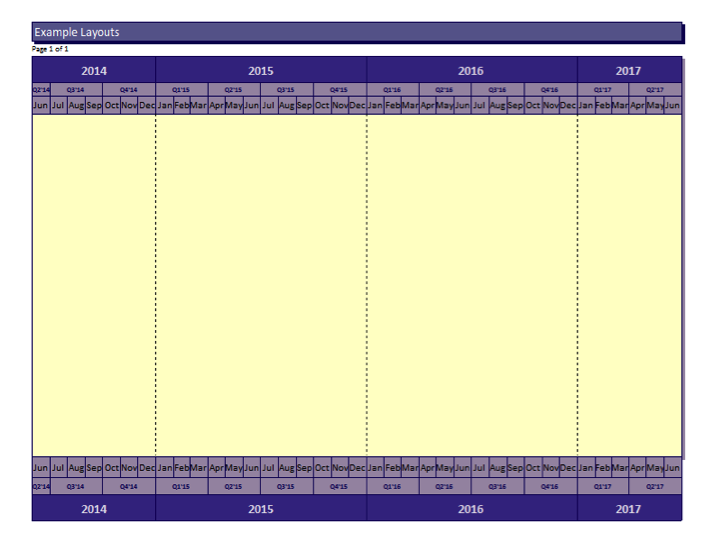
[SDG 5.0] Select the background and frame to best fit the environment for the schedule. How the display is framed and subdivided significantly impact on how it is viewed. Do you want a plain blank background or do you want to subdivide the background in any way? Should your schedule have horizontal swim lanes to focus on sequential related work? Do vertical lines help you make your point? What calendar display should you use? Should you have a legend; do you need one?

Background color selection must be done in coordination with the color scheme for the symbols so that the proper amount of contrast can be established to help let the symbols stand out on the background. The correct background color will enhance the readability and impact of the display.

Because this example is a U.S. Navy project, colors in the blue and gold realm will be used in the background. In this case, swim lanes would make it more difficult to portray the two major efforts of the project coming together since swim lanes tend to keep elements separate. Because the project is a multi-year, vertical drop lines for the years will be used to help the viewer see the plan unfold across them. The background is a light color that recedes into the frame of the calendar. The calendar shows three levels: year, quarter, and month for clarity.

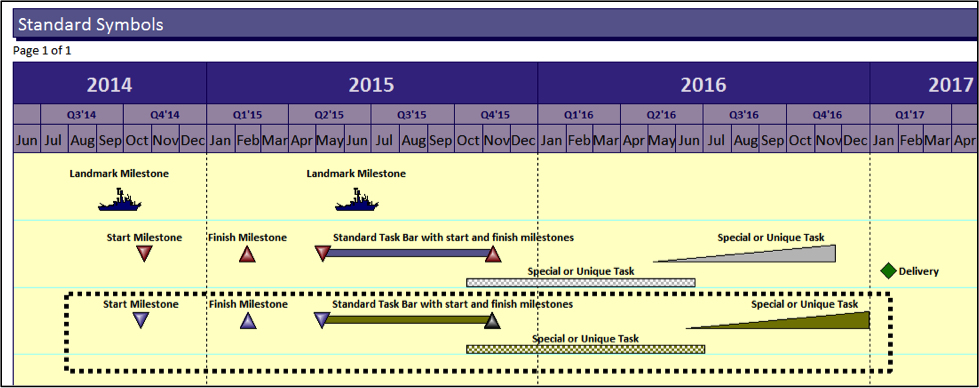
Milestones Professional 2012 Version | Schedules Display Guidelines (SDG) example #1

All graphic examples in this paper were produced using Milestones Professional 2012 Version.

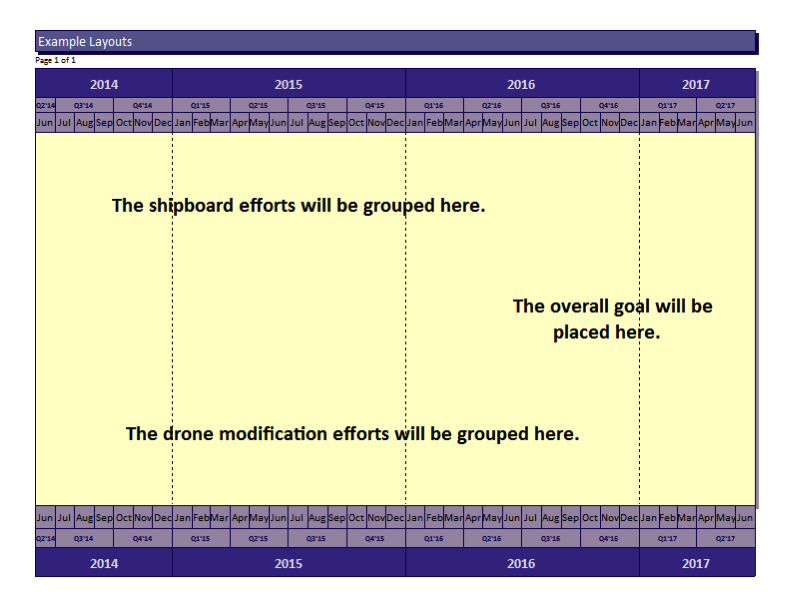
[SDG 6.0] Group the display to best tell the story of the project, emphasizing the project flow from start to the various goals. Grouping is one of the key decisions in building the display. This is best done when the groups are natural or logical. The groups can be vertical groups related to timing like phases, horizontal groups of related types of work, groups by performer or supplier, or done to emphasize some other important grouping. If a project has a single goal, the waterfall top-to-bottom and left-to-right approach might be best. If the project has more than one goal, you should evaluate if the work can be grouped to show those various thrust or interest areas? If the project has some major subprojects or major players, would those factors lead you to a specific grouping set of criteria?

In this example two major groups will be built to show the shipboard and the drone efforts as groups coming together for the goal. A third group will be put at the bottom to contain miscellaneous work.

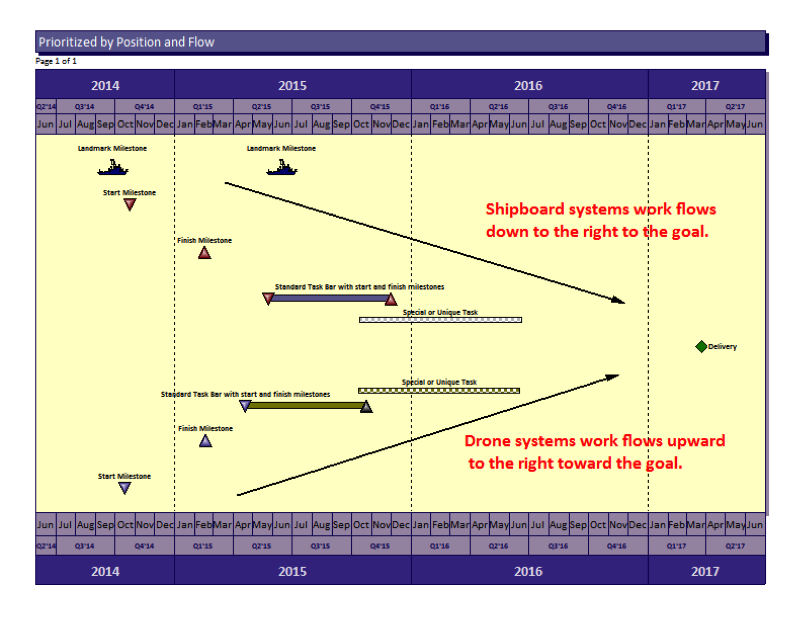
Milestones Professional 2012 Version | Schedules Display Guidelines (SDG) example #2

[SDG 7.0] Select and use as small a set of standard symbols as you need to cover the environment. Symbols should be standardized across the schedules developed by an organization or company. Once a usable set of symbols is employed and used rigorously, the level of ease of perception, recognition, and interpretation will improve and the speed of comprehension will grow.

The idea of standardizing is a way to help us move more quickly from perception to cognition. After all, we are using the schedule information so that we can think about the schedule, the project, the issues, the outcomes, and so on. That is cognition or analysis. The schedule is a tool to help us with our cognition so we don’t want the schedule itself, the way it is presented, to get in the way. On the contrary, we want to have the best way to quickly get the message to the thinking part of our brains.

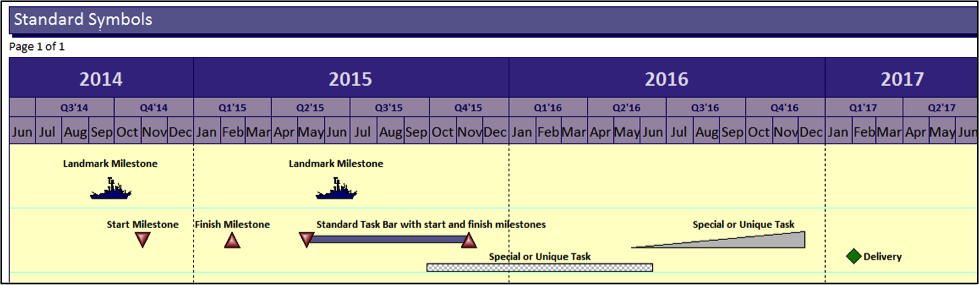
[SDG 7.1] Landmark milestones should be unique in shape and color as well as position. Landmark symbols are important symbols that would show on every page or would show on the prime contractor and subcontractor schedules to anchor the various versions in the eyes and minds of the readers.

Because this is a U.S. Navy project the shape of a ship has been used as the landmark symbol for top level milestone. The other symbols show milestones as triangles so that they come to a point at a specific date. Other bars are used to show durations and durations with special attributes. These special task bars will help the reader spot uniqueness in the plan. Deliveries are shown as a unique diamond shape to help the eye find them on the plan.

Milestones Professional 2012 Version | Schedules Display Guidelines (SDG) example #3

[SDG 8.0] Use a few basic colors to differentiate and highlight your schedule display; red, green, yellow and blue are good choices for basic presentations. Colors are easily perceived if selected carefully. The research indicates the colors best suited to display. Colors can be a negative factor if they have emotional content.

In this example the same symbols will be kept but colors will be modified for emphasis. The shipboard tasks will be one color scheme while the drone tasks will be another. Deliveries will be a consistent green diamond since green provides the idea of “go”. Ancillary tasks will default to the shipboard scheme rather than having a third color scheme which would make the plan less readable. Where the two efforts come together, the final joint effort will be highlighted by color.

Milestones Professional 2012 Version | Schedules Display Guidelines (SDG) example #4

[SDG 9.0] Prioritize the display to enhance the story. Priority can be established by size, color, sequence or a combination of techniques. Priority in schedule display leads the viewer through the schedule so it is an important concept and an important attribute of the display.

Place important landmark milestones at the top. Prioritize your groups in logical order according to the specific project goals. In this example, the shipboard systems will be positioned just below the landmark milestones and will waterfall down to the right to the goal. This implies that the shipboard system work “leads off” and is of high importance. The drone systems will flow upward from the bottom left to the goal, The “Vee” shape will emphasize the supportive nature of this effort and how the two major thrusts come together at the goal.

Milestones Professional 2012 Version | Schedules Display Guidelines (SDG) example #5

[SDG 10.0] Add comments to the schedule at important decision points, important transition points, and to enhance comprehension where that is needed. Movement from one phase to another is an important transition that you could explain. The sequential transition from design, to build, to testing marks major changes in the type of work on a project; these points would be logical places for comments. Decisions that dramatically affect the project should be mapped onto the schedules and highlighted with comments. For example, the decision whether or not to authorize additional product builds, or other follow-on efforts, are important points in a plan.

[SDG 11.0] Examine the display and analyze it according to its adherence to the guidelines as well as its impact. Does it get the job done? Modify as needed to complete the display. Try it out on people to see if they can spot weaknesses or suggest improvements.

Here is the final example of the plan. Review and analyze this display in terms of its adherence to the guidelines and how far it goes in providing the top level executive summary schedule needed for the project.

Milestones Professional 2012 Version | Schedules Display Guidelines (SDG) example #6

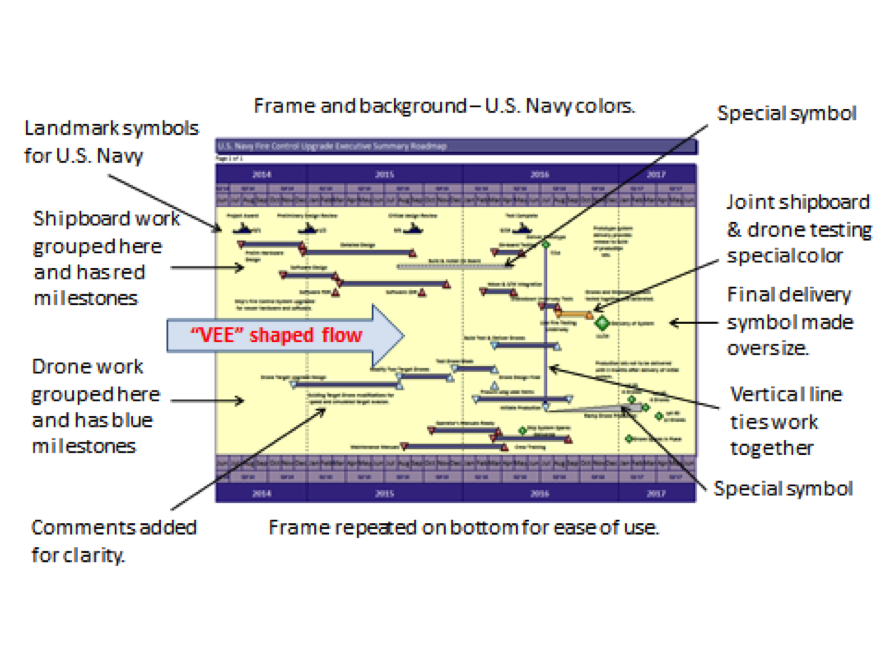
The analysis of the final overall example shows the elements added that correspond with the schedule display guidelines.

Milestones Professional 2012 Version | Schedules Display Guidelines (SDG) example #6 details

Paul F. Bolinger is an Engagement Director with Humphreys & Associates consulting in project management with a specific emphasis on project scheduling. His experience with project scheduling tools like Primavera and Microsoft Project has proven there is a need for high level well-constructed schedule displays. He has consulted on many projects including electronics, aerospace, nuclear power, shipbuilding, and construction.

Guidelines for Schedule Displays Read Post »

EVM: The IPMR and Subcontract Flowdown

, , , , , ,

EVM Contractors, EVM Subcontractors, IPMR & Flowdown

For decades government EVM project managers performed the task of integration of all prime and subcontractor performance and the associated data on a project. In the late 1960s things changed. The U.S. Federal Government mandated that the prime contractor become the integrator of the performance and the data. Many contractors undertook this responsibility nicely. However, for many contractors in this new role their subcontract management expertise and data accumulation capabilities were lacking on large R&D, SDD, and LRIP subcontract efforts in particular. The primes needed to include all of the data from their subcontractors that comprised as much as 80% of the contract effort. The timing of subcontractor reports became very important. However, software was “what it was” in the 1960s and ‘70s, and many EVM subcontractors were unable to meet the required delivery dates.

In the early 1980s the National Security Industrial Association [now the NDIA] conducted a survey and found that 40% of the subcontractor data was delayed by a month [additional reference, 2008 – NDIA.org source]. Consequently, January data from subcontractors would not be entered into the prime contractor’s performance reports [now IPMR or CPR] until the prime’s February report which may be delivered around 15 March. Today’s software has improved extensively and many EVM subcontractors recognize the importance of timeliness of data; they are also prime contractors on other EVM projects.

Many companies have not yet begun delivering performance data using the new Integrated Program Management Report (IPMR). Companies that are using the IPMR appear to be adapting well to the new requirements, specifically in regards to the submission date and successful retrieval of subcontractor data. The new IPMR Data Item Description, DI-MGMT-81861, specifically requires that “Formats 1-6 shall be submitted to the procuring activity no later than 12 working days following the contractor’s accounting period cutoff date. This requirement may be tailored through contract negotiations to allow submission as late as 17 working days, provided the contractor and Government agree that contract complexity and/or integration of subcontractor and vendor performance data warrant additional time and will yield more accurate performance.”

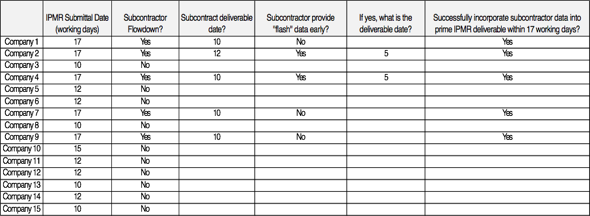
The table below illustrates the results of a survey H&A conducted of fifteen major contractors. While the sample size is small, the survey found that five prime contractors had an IPMR requirement flowdown to a subcontractor with NTE 12 working days submission CDRL requirement. In all five cases, the prime contractors were able to successfully incorporate subcontract data in time to meet the submission requirement.

EVM IPMR chart

While it has taken over 40 years, it is now recognized by both the government and contractors that timely incorporation of subcontractor performance data in the prime’s performance report helps validate the project data–the purpose of early visibility and prompt decision making.

Our survey found that those contractors submitting the IPMR are successfully incorporating subcontractors’ performance data in their IPMRs as the DID Instructions stipulate. It is hoped that the era of the “one-month lag” with subcontractor performance data has ended; and the government will be receiving accurate, timely IPMR performance data from its prime contractors.

EVM: The IPMR and Subcontract Flowdown Read Post »

Aligning ACWP with BCWP for Proper EVM | Earned Value Management

, , , ,

Last Updated May 22, 2025

ACWP and BCWP by DAU

What is estimated Actual Cost of Work Performed (ACWP)?

Estimated ACWP is an adjustment to the actual cost data imported into the EVM cost tool as the Actual Cost of Work Performed (ACWP) to align ACWP with Budgeted Cost for Work Performed (BCWP).  Estimated ACWP is synonymous with “estimated actuals.”

Why is Estimated ACWP necessary?

Without Estimated ACWP, timing mismatches between ACWP and (BCWP) cause false cost variances to be calculated in the EVM cost tool as well as from the data in the Integrated Program Management Data Analysis Report (IPMDAR) Contract Performance Dataset (CPD).  Typically these variances are favorable and can mask other unfavorable variances.  Additionally, if these variances exceed reporting thresholds, the explanations clutter the IPMDAR Narrative Report with variance explanations that discuss timing problems of the accounting system rather than actual performance issues.

When should Estimated ACWP be used?

Estimated ACWP is most typically required for material costs.  For example, when BCWP is claimed upon receipt of the material, the payment for accrued costs in the accounting system typically occurs one or more months following material receipt, which creates the timing mismatch between BCWP and ACWP in the EVM cost tool.  Other cost element types that may require Estimated ACWP include subcontracts and Other Direct Costs (ODC).  Examples of ODCs that may require Estimated ACWP include staff augmentation, purchased labor, and travel.

How does Estimated ACWP function?

Receipt-type material:

  1. First, a determination must be made whether Estimated ACWP is necessary.  For some categories of material, when a material item is received, the BCWP is claimed in the EVM cost tool.  If actual costs for the materials do not enter the accounting system in the same period that the BCWP was claimed, Estimated ACWP is necessary to ensure ACWP occurs when BCWP occurs.
  2. Second, the Estimated ACWP adjustment is entered into the EVM cost tool as a current period transaction.  The amount of the Estimated ACWP is based on the best information available for the material item (often accrued costs in the accounting system) using the invoice, purchase order, or receiving report.
  3. Third, the Estimated ACWP adjustment transaction is reversed in the EVM cost tool when the actual costs are recorded in the accounting system; this could be the following reporting period or later.  If actual costs were to come in that month and the transactions were not reversed, the ACWP would be double-counted when the actual cost data from the accounting system is imported into the EVM cost tool. Also, the Estimated ACWP transaction should be recorded in a log to maintain traceability. 

Production-type (inventory) material:

For production type materials, or materials that are common to many control accounts or even contracts, that go into inventory, earned value is claimed upon issuance from inventory, sometimes several months after receipt of the material and after the incurrence of actual costs in the accounting system.  In this case, the opposite condition would exist.  The accounting actuals occur before earned value is claimed for material. The EVM rules in the EIA-748 Standard for EVMS Revision D Guideline 21 or Revision E Guideline 14 (and common sense) state that ACWP is not to occur until BCWP takes place.  Therefore, the accounting actual costs have to be “suppressed” from entering the EVM cost tool until material earned value is claimed. Since some companies say they cannot suppress actual costs, they let the actual costs enter the system, but make an off-setting “Negative Estimated ACWP” entry in the EVM cost tool until the material is issued and BCWP can be claimed for the material.

Do you need to implement an Estimated ACWP process in your Earned Value Management System?  Humphreys & Associates has the earned value experts to assess your material management processes and to help you implement the appropriate procedures. Contact us today.

Aligning ACWP with BCWP for Proper EVM | Earned Value Management Read Post »

Scroll to Top